- Ma'afinator breaks a signal apart: grit, hard clipping, and dropouts.
- Benzonizer makes it bigger and denser: soft saturation, a lift and a wider image, and glue compression.
You can run either engine, or both in series. Each engine has its own Mix against the dry signal. The plugin adds no latency.
How to read this guide
Do A first pass once. Then use the headings as a reference. Tips on the rail turns on a one-line explanation when you hover.
People also ask
What is Paraflex Duality?
A stereo effect with two engines and no added latency. Use one, or run both in series.
What is the Ma'afinator?
The engine that breaks a signal apart: Crush, Distort, and Drop. Mix blends it with the dry signal.
What is the Benzonizer?
The engine that makes a signal bigger: Saturate, Inflate, and Compress, with a gain-reduction readout. Inflate's width follows the Mix.
Does Duality add latency?
No. You can leave it on a live track. Delta plays only what changed.
What Duality is for
- Lo-fi and damage on drums, vocals, bass, and samples, with a mix knob so the damage can be a parallel layer.
- Weight and glue on a bus or a stem, with makeup already in the compressor so the level stays in the same neighbourhood as you squeeze.
- Both, when you want grit that is then made large, or a large signal that is then broken. The order is a switch.
Use one instance for one job. Duality on every track, fully wet, will make a mix that is all Duality. The Mix knobs exist so that does not have to happen.
What you need
| macOS | macOS 12 or later, Apple silicon or Intel |
| Windows | 64-bit Windows 10 or later |
| Sound | A stereo or mono source from the host |
| Formats | This release: VST3 on Windows and macOS. Audio Unit and AAX are not in this release. |
The footer shows the version and the format. This release opens as VST3. Audio Unit and AAX are not in the installer yet. Duality reports no latency. You do not wait for it, and you do not budget delay compensation for it.
Close the host before you install or update.
Install
macOS
- Double-click the installer package.
- If macOS says it cannot check the installer, close that warning, open System Settings → Privacy & Security, choose Open Anyway, and enter your password.
- Finish the installer. It needs an administrator password.
What it places:
- VST3:
/Library/Audio/Plug-Ins/VST3/Paraflex Audio/Paraflex Duality.vst3 - Audio Unit:
/Library/Audio/Plug-Ins/Components/Paraflex Duality.component - AAX, when the installer includes it:
/Library/Application Support/Avid/Audio/Plug-Ins/
If a host says the plugin is damaged, quit the host and clear the quarantine:
xattr -dr com.apple.quarantine "/Library/Audio/Plug-Ins/VST3/Paraflex Audio"
xattr -dr com.apple.quarantine "/Library/Audio/Plug-Ins/Components"
Windows
Run the setup and accept the license.
- VST3:
C:\Program Files\Common Files\VST3\Paraflex Duality.vst3 - AAX, when included:
C:\Program Files\Common Files\Avid\Audio\Plug-Ins\
If the window opens as a plain panel of controls, run the setup again and restart the host.
After installing
Rescan. Logic Pro: Settings → Plug-in Manager → Reset & Rescan Audio Units. Ableton Live, Reaper, Cubase, Bitwig, and Studio One load the VST3. Pro Tools loads AAX only, and only if that component was installed.
Two copies in the list usually means a second plugin in your user folder (~/Library/Audio/Plug-Ins on macOS). Keep the system copy, remove the extra, rescan.
Duality in an audio-effect slot.
License
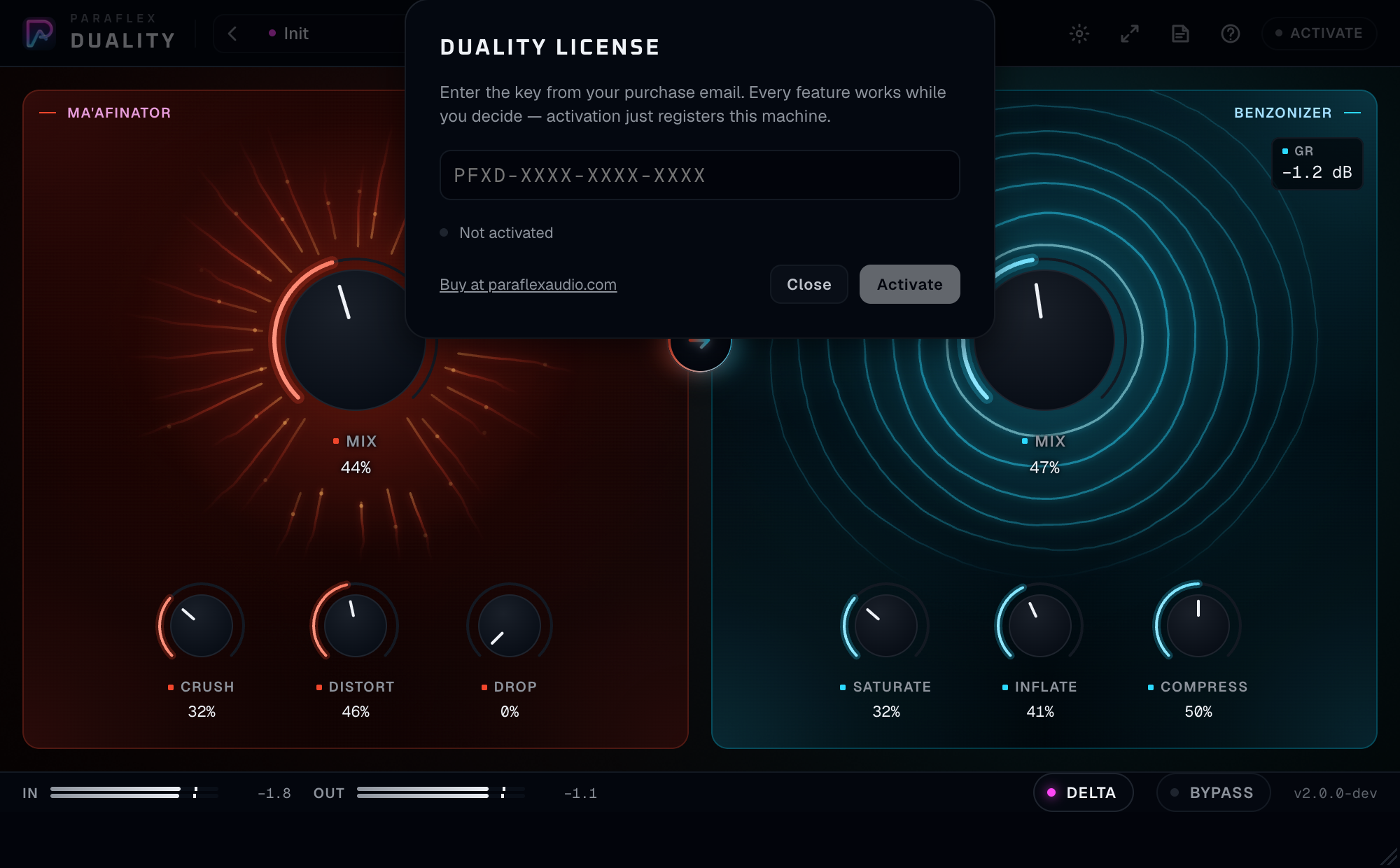
PFXD-XXXX-XXXX-XXXX.Click Activate on the rail.
- The key looks like
PFXD-XXXX-XXXX-XXXX. - Until this computer is activated, Duality stays silent, including when Bypass is on. Activation registers this computer and the sound comes back at the same reported latency.
- One key on one computer at a time. Deactivate before you move the key.
- After a successful activation the plugin keeps working away from the internet until the date in that activation, and then for seven more days. The sheet shows how many days remain. When that period ends, Duality is silent until you connect and open it.
- Buy at paraflexaudio.com is on the sheet. The purchase, tax, and refund are handled there. Questions about the plugin go to support@paraflexaudio.com.
The chip reads Licensed when this machine is activated.
A first pass
- Put Duality on a drum loop or a bass. Press play.
- You start on Ma'afinator. Raise Distort until the hits bite, then pull Mix back until the dry attack is still in front.
- Switch the mode control to Benzonizer. Distort is no longer in the path. Raise Saturate a little and Inflate a little. Watch GR as you raise Compress.
- Turn Dual on. Both worlds appear. Leave both Mix knobs around halfway and listen to the order printed on the arrow.
- Click the arrow once. The engines ease out and back in so the swap does not jump. Listen to which order you prefer.
- Click Delta. You should hear only what Duality is adding and removing. Click it again to return to the full output.
- Click Bypass and back. The timing of the hit should not move.
Ma'afinator
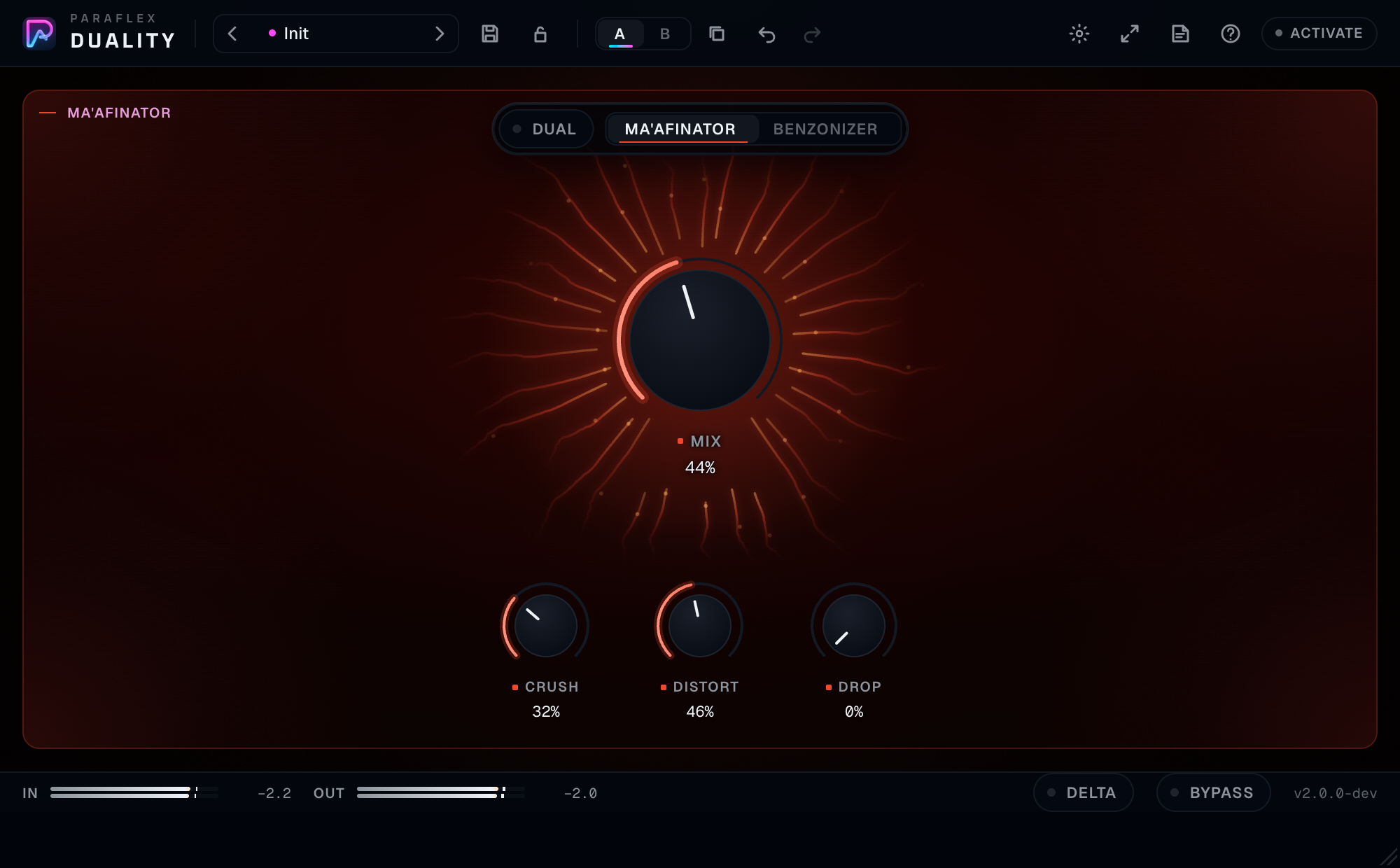
The red world. It is the engine that takes things away and makes them harsher.
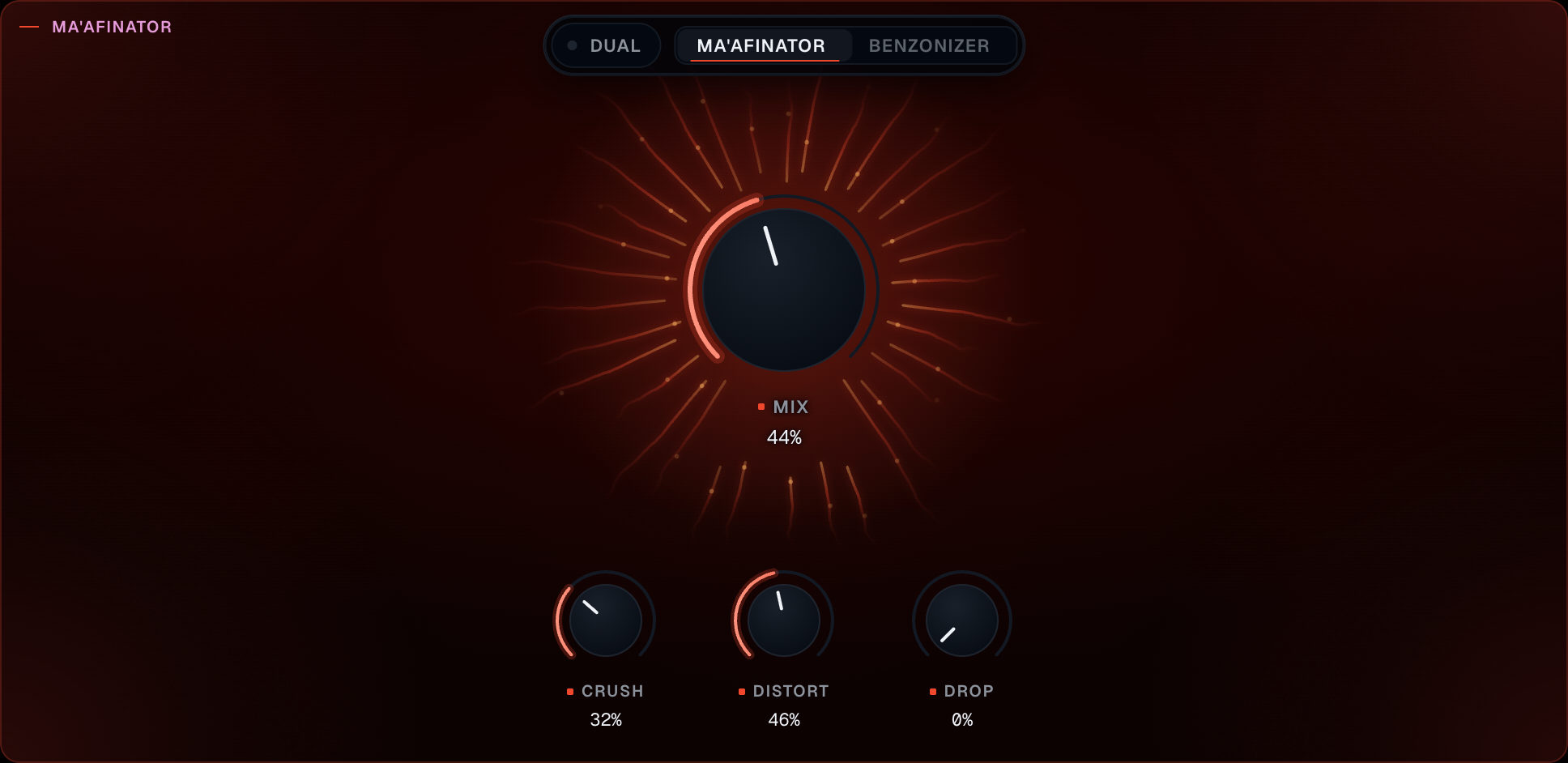
| Control | What you hear | Starts at |
|---|---|---|
| Mix | This engine blended with the dry signal. Fully dry at zero, fully this engine at full. No added latency | Dry (zero) |
| Crush | Bit-depth and sample-rate reduction together, from fine grit to a stepped, aliased tone | Off |
| Distort | Hard clipping. A fast leveller behind it keeps the level from leaping when the clip bites | Off |
| Drop | Random gaps cut into the signal. Higher is longer and more often | Off |
A knob that is all the way down is out of the circuit. You can leave Crush at zero and use only Distort.
Mix is a crossfade with the dry signal for this engine, not a send to a bus somewhere else. At halfway you hear both. At full you hear only Ma'afinator’s output, which is why a full-wet Crush sounds smaller and harsher than the same Crush at a low Mix in parallel.
Drop is a performance control. A little of it on a hat loop is a stutter. A lot of it on a vocal will remove words. Automate it for a moment in a bar rather than leaving it high for a whole take, unless that is the arrangement.
The drawing in this world follows the audio this engine is producing. It is a picture of the damage, not a control.
Benzonizer
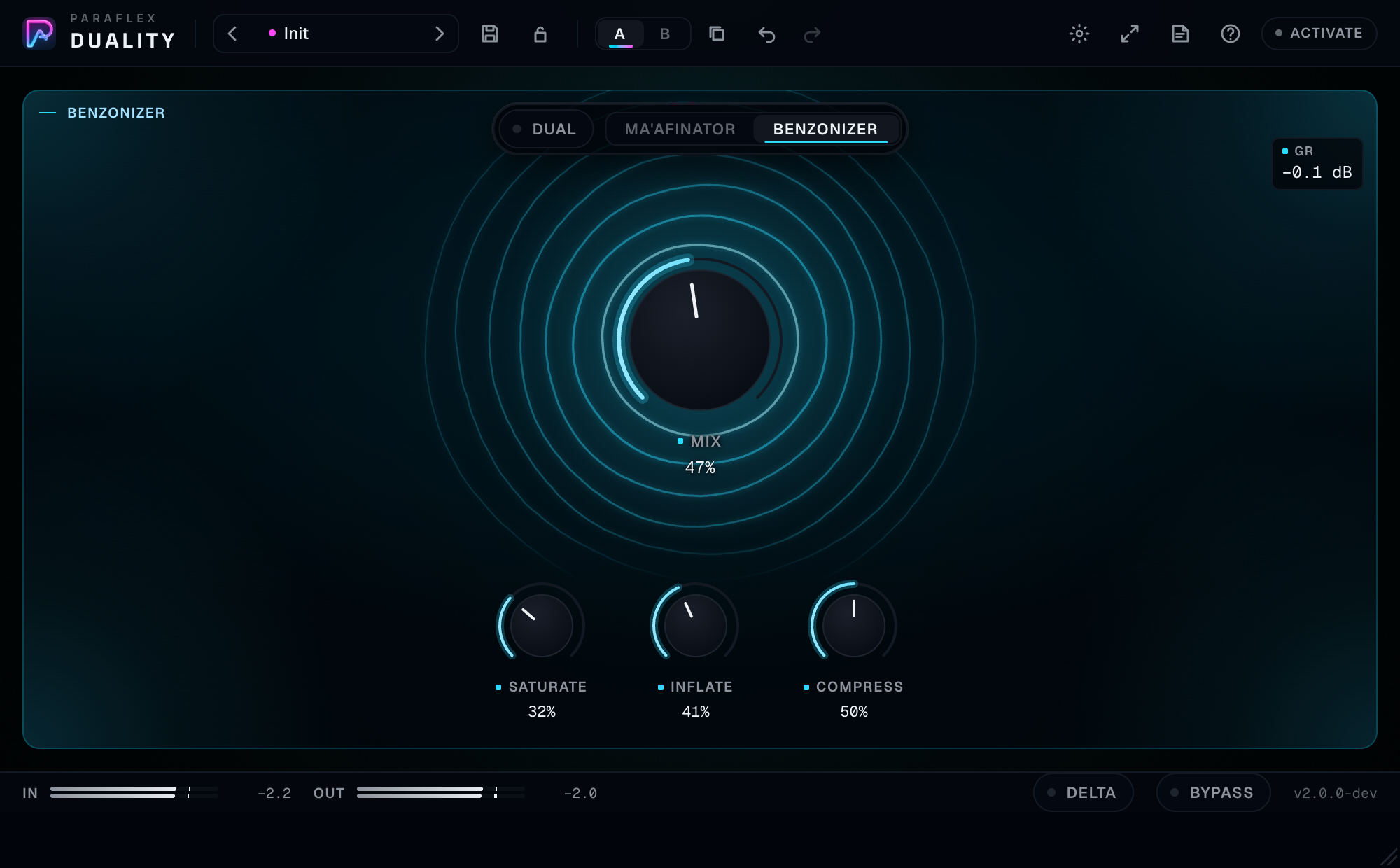
The cyan world. It is the engine that adds weight, width, and glue.
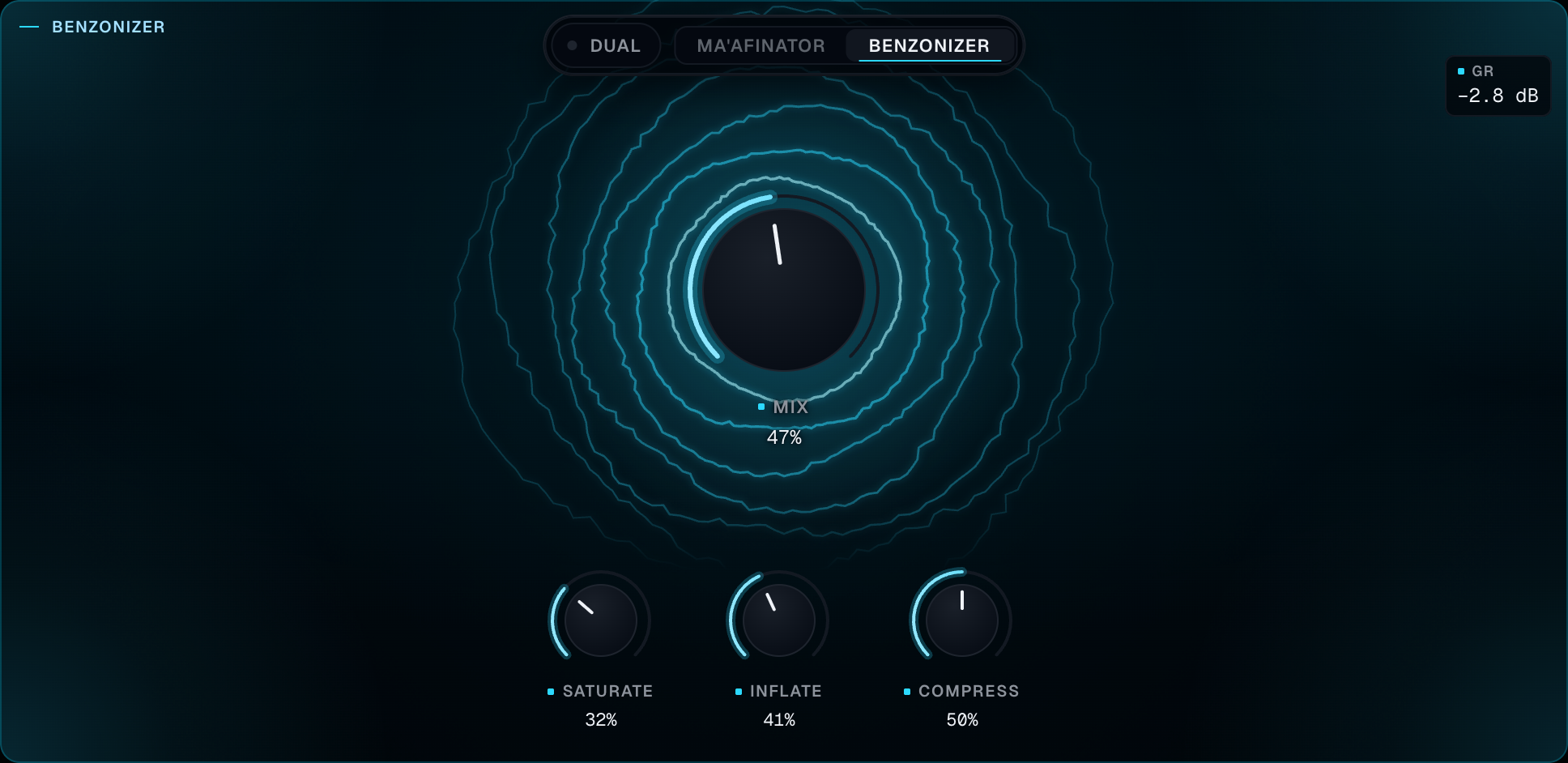
| Control | What you hear | Starts at |
|---|---|---|
| Mix | This engine blended with the dry signal. It also scales how much Inflate is allowed to widen the stereo image | Dry (zero) |
| Saturate | Soft saturation blended in: warmth, rounder peaks | Off |
| Inflate | A high-shelf lift, a dip in the low midrange (around 370 Hz), gentle saturation, and a wider image | Off |
| Compress | Glue compression with automatic makeup, so turning it up does not simply get quieter | Off |
GR is gain reduction, in decibels. It reads 0.0 dB when the compressor is idle. A reading like −3.2 dB means the peaks are being pulled down by about that much, and the makeup has put the body of the sound back. If GR never moves, Compress is off or the signal is too quiet to reach the threshold. Turn Compress up, or feed Duality a healthier level.
Inflate’s widening follows the Benzonizer Mix. A fully dry Mix does not widen. If you want width without the full engine, ride Mix and Inflate together rather than expecting Inflate to widen at Mix zero.
Saturate here is soft. Ma'afinator’s Distort is the hard clip. If you wanted warmth and got shards, you are on the red engine.
Dual and order

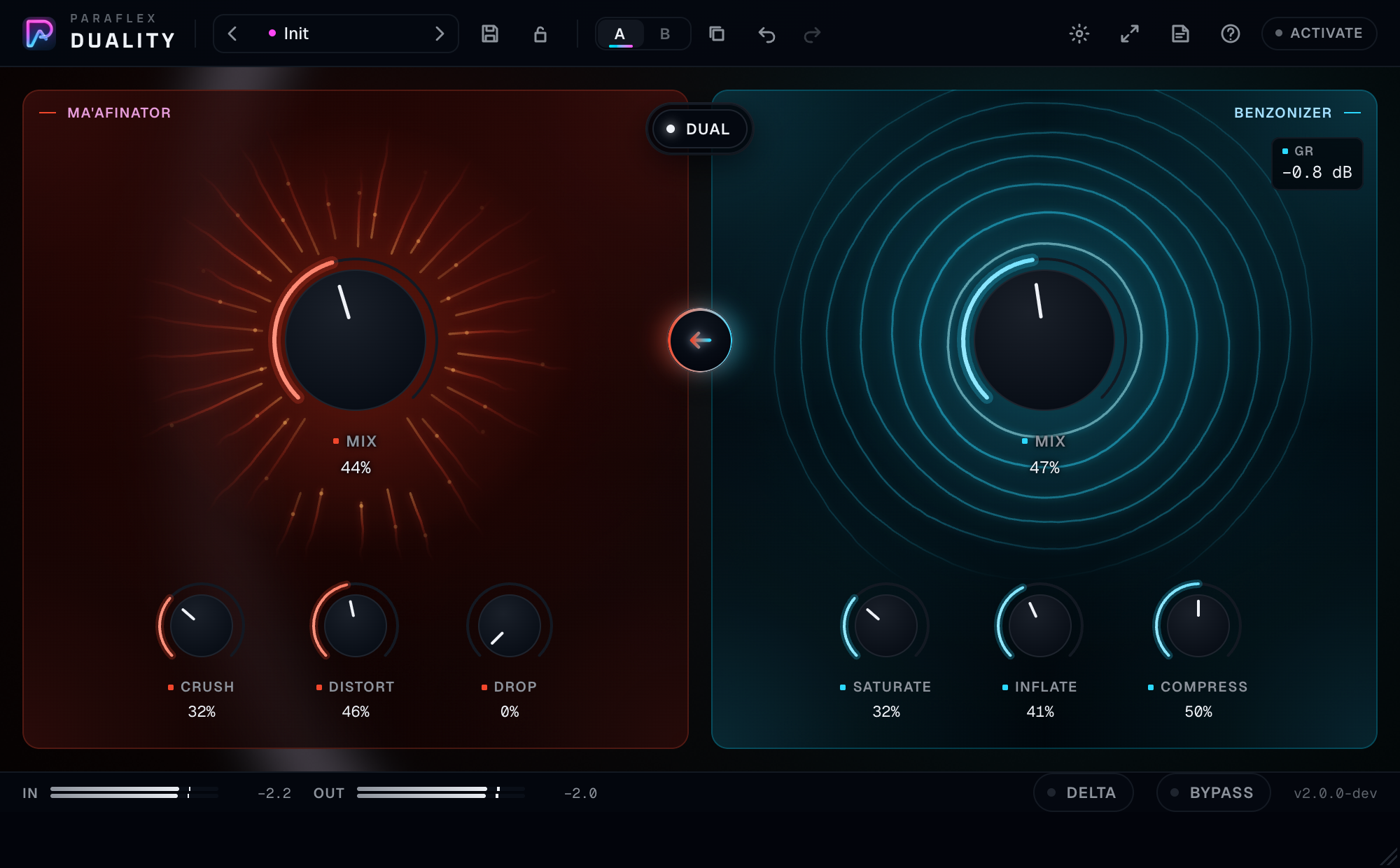
Benzonizer → Ma'afinator or Ma'afinator → Benzonizer, sitting on the seam between the worlds.Dual runs both engines in series. Each Mix still blends that engine. They are not forced fully wet just because Dual is on.
The mode switch (Ma'afinator | Benzonizer) shows only when Dual is off. When Dual is on, both worlds stay on screen and the arrow is the order.
| Order | What happens |
|---|---|
| Benzonizer → Ma'afinator | This is the order a new Dual starts in. The signal is made bigger and denser, then broken. Crush and Drop chew on an already loud, wide sound |
| Ma'afinator → Benzonizer | The signal is broken first, then softened, lifted, and glued. Damage becomes the texture inside a larger sound. This is often the kinder order for a bus |
Click the arrow to reverse. If both engines are actually running (their Mix above zero and their knobs doing something), Duality eases both of them to dry, swaps, and eases back. You will hear a brief dip. That dip is the plugin refusing to click. If only one engine is running, the order changes at once because you cannot hear it.
Both Worlds, the factory preset, turns Dual on and sets both mixes and a taste of Distort and Saturate. It does not change the order, so you get Benzonizer first unless you have already flipped the arrow and the preset left it alone. Listen, and look at the arrow, rather than assuming.
Presets do not change Bypass or Delta. You can browse sounds while you are soloing the difference, and you will stay in Delta.
Delta and Bypass

Delta plays only what this plugin changes: the processed signal minus the input. Use it to hear the grit, the width, the compression, and the dropouts without the dry program in the way.
- Mix at zero means the plugin is not changing anything, so Delta is quiet. That is correct.
- Mix at full means Delta is the difference between the fully processed engine and the original, which is often almost the whole sound, especially with Crush or heavy compression.
- The useful position is the Mix you actually intend, then Delta, so you hear exactly the layer you are adding at that blend.
Bypass eases to the original signal. Duality has no latency, so there is nothing to compensate, and the ease is there so the toggle itself does not click. Presets leave Bypass where you set it.
Click a meter number to clear its peak hold.
The Paraflex window
Rail

| Control | What it does |
|---|---|
| Preset arrows | Previous and next |
| Preset name | Browser. A dot means the preset has been edited |
| Save | Name and category. Enter saves, Escape cancels |
| Wet lock | Keeps both Mix knobs where they are while you browse |
| A / B | Two setups, instant, undoable |
| Copy | Copies the sounding side onto the other |
| Undo / Redo | Your moves in this window |
| Aura | Full, Subtle, or Off. The glow only. Sound unchanged |
| Size | S 80%, M 100%, L 125%, XL 150% |
| Guide | Opens this guide on paraflexaudio.com |
| Tips | Hover text. Off until you turn them on |
| License | Activation |
The first time you open Duality, a short walkthrough points at presets and at Dual, then at Guide and Tips. A category name in the browser is a heading you can click to fold that group. Skip the walkthrough or step through it. It does not change the sound, and it does not come back on this computer.
Wet lock is the right control on a mix bus. Set how much of each engine you want against the dry music, lock, then try Grit Lift and Wall of Glue without losing your blend. The character knobs still come from the preset. Bypass and Delta stay as they were.
Factory presets
| Preset | Category | Listen for |
|---|---|---|
| Grit Lift | Ma'afinator | Ma'afinator, Mix open, a little Crush, more Distort |
| Lo-Fi Stutter | Ma'afinator | More Crush, Drop open, Mix quite wet |
| Wall of Glue | Benzonizer | Compress and Inflate, Mix open |
| Inflated Bus | Benzonizer | Inflate forward, some Saturate, Mix high |
| Both Worlds | Dual | Dual on, both mixes around half, Distort and Saturate both open |
Init clears you back to dry mixes and knobs down, on Ma'afinator, Dual off. Your Live-style monitoring choices are not a feature here. Delta, if it was on, stays on.
Search, stars, and delete work as they do across Paraflex plugins. Factory rows cannot be deleted. User presets can. User presets belong to your account. The song stores the sounding setup, the preset name, the edited dot, and wet lock.
A and B are for the sitting you are in. Save a preset if you need an idea tomorrow. Undo here does not track the host’s automation moves. Those belong to the host.
Knobs
Drag up or right to increase. Shift or Ctrl is fine mode. Scroll nudges. Double-click or Option / Alt-click resets to the default, which for these knobs is off or dry. Click the number to type a percent. The value card waits a moment before it appears, then moves quickly between neighbours, and stays pinned while you drag.
Some hosts also list a Visualizer switch. It is kept so older sessions open cleanly. The window always draws the engines. You do not need to automate it.
Signal path
Single engine
- Input is metered.
- The engine you selected processes.
- That engine’s Mix blends it with the dry input.
- Delta, if on, keeps only the difference.
- Bypass, if on, eases back to the input.
- Output is metered.
Dual
- Input is metered.
- The first engine processes, then its Mix blends.
- The second engine processes that result, then its Mix blends.
- Delta and Bypass behave as above.
Because the second Mix blends against the signal it received — which may already include the first engine — a low second Mix brings back the first engine’s output, not necessarily the original dry track. If you want a clear original, lower the first Mix too, or use Bypass for a true original and Delta for a true difference.
Changing order while both engines run dips through dry on purpose.
Ma'afinator’s own help on Mix is the latency promise for that engine: no added latency. The whole plugin matches that. Benzonizer does not add a look-ahead delay either.
Working habits
Parallel first. The most reliable Duality move is a low Mix of a strong engine, so the dry timing and tone stay, and the engine is a layer. Fully wet is a sound-design commit. Decide which one you are doing and set Mix accordingly before you touch Crush or Inflate for ten minutes.
One job per pass. Ma'afinator for damage, Benzonizer for size, Dual only when you have heard each alone and you know why they should be in series. Both Worlds is a starting point, not a default on a master bus.
Order is musical. Break-then-glue (Ma'afinator into Benzonizer) rounds the damage off and is the usual bus order. Glue-then-break (the default arrow) makes the damage louder and wider because it chews on an inflated signal. Click the arrow and listen once. Keep the one you can name.
Use GR as a ceiling on your enthusiasm. Glue of a couple of decibels holds a bus. Continuous deep GR, with Inflate also up, is a loudness effect. Makeup will let you do that without the meter collapsing, which is why it is easy to overdo. Delta and a bypass comparison tell you whether the music got better or only louder and wider.
Inflate moves stereo. Check the sides and check mono. A widened, dipped-midrange signal can be gorgeous in speakers and hollow in mono. If the mono fold falls apart, lower Inflate or Benzonizer Mix. Paraflex Mono Optimizer is the tool for a mix that must survive a mono fold. Duality’s Inflate is a widening effect and will not repair one.
Drop is arrangement. Automate it. A static high Drop on a lead vocal is a mistake more often than a style.
Crush and Distort together get small and harsh. If the track disappears, lower Crush first. Distort with the leveller is the one that can stay louder. Mix brings the original size back without you having to undo the tone.
Do not stack a second compressor blindly after heavy Benzonizer compression. You already have glue and makeup. Another compressor will ride the makeup. If you need a limiter for a ceiling, put a limiter after, lightly, or use the safety limiter in Mono Optimizer when that is the next plugin.
Wet lock, then preset, then one knob. Lock the mixes, load a preset to change character, then adjust the single knob that is still wrong. That is faster than rebuilding Grit Lift by hand every session.
A/B before you print. Copy to the other side when you like a setting. Try the other order or a lower Mix. Switch back within a few seconds. Long gaps make everything sound better.
Gain into the plugin matters. Compress and Distort respond to level. A whisper-quiet clip will not light GR. A clip that already hits full scale will crush immediately. Set the track so In peaks have some room, then let Duality do the colour.
Delta is a solo of the effect, not a new sound to bounce by accident. Bounce with Delta off unless you truly want only the difference printed. The pill is easy to leave on because presets refuse to clear it.
Recipes
Parallel drum grit
Ma'afinator. Distort up until the snare has a bark. Crush just above off, or off. Drop off. Mix low, around a quarter to a third. Dual off. Wet lock on. Bypass to confirm the drums got meaner without getting smaller.
Stutter moment
Lo-Fi Stutter as a start. Automate Drop up for half a beat and back to zero. Leave Crush where the preset put it or lower. Do not leave Drop parked up for the whole chorus unless the chorus is supposed to be gapped.
Bus glue
Benzonizer. Saturate low, Inflate low to moderate, Compress until GR is gently moving on the loudest hits. Mix to taste, often well above halfway on a drum bus and lower on a full mix. Check mono. Delta once to hear whether you are mostly adding width. If Delta is almost all stereo difference and little tone, Inflate is doing more than Compress. Decide if that is what you wanted.
Broken then finished
Dual on. Arrow set to Ma'afinator → Benzonizer. Ma'afinator Mix moderate, Distort moderate, Crush low, Drop off. Benzonizer Mix moderate, Saturate and Compress low, Inflate lower than you would use alone, because the damaged signal is already bright. This is a stem treatment.
Fully wet damage
Ma'afinator Mix at full. Accept that the dry attack is gone. Then set Crush and Distort. Use Output nowhere — there is no output trim. If you are too loud, lower the drive knobs or the track after Duality. Putting Mix back down is the better musical fix, because it returns the original dynamics.
Common questions
Mix is up and nothing changes. The character knobs are at zero, so the engine is blending in a copy of an almost untouched signal. Turn up Crush, Distort, Drop, Saturate, Inflate, or Compress. Or you are looking at the engine that is not selected. In single mode the other engine is out of the path.
I turned Inflate up and the width did not change. Benzonizer Mix is dry, or you are on Ma'afinator only. Inflate’s widening scales with the Benzonizer Mix.
Dual is on and lowering the Benzonizer Mix did not bring my original back. The original has already been through Ma'afinator if Ma'afinator is first, or you are hearing Ma'afinator’s blend if Benzonizer is first and you lower Benzonizer. Lower both mixes, or Bypass, to hear the untouched input.
The sound dipped when I clicked the arrow. Both engines were running. Duality fades through dry to swap the order without a click. Wait for the fade. It is short.
Delta is silent. You are fully dry. Raise a Mix and a character knob.
Delta is huge. You are very wet, or Inflate and Compress are moving the signal a lot. That is the difference you asked to hear. Turn Delta off to judge the real output.
The level went up when I added compression. Makeup is doing that. Lower Mix, or lower Compress, or turn the track down after the plugin. Do not keep adding Inflate to “hear the compressor.”
GR stays at 0.0 dB. Compress is off, or the input is quiet. Raise Compress. Watch In. If In is barely moving, the track needs level before Duality.
A preset turned Dual off while I was viewing both worlds. The preset includes the mode. Wet lock kept your Mix knobs and did not keep Dual. Load Both Worlds, or turn Dual back on. Your Mix values should still be where you locked them.
Bypass and Delta did not follow the preset. They are preserved. Set them yourself.
There is a latency number in the host and I expected zero. Duality’s own delay is zero. A number you see may be another plugin on the track, or a host that shows a buffer. Duality itself does not ask for plugin delay.
The window is plain sliders. Run the Windows installer again, or update macOS, then restart the host.
Pro Tools does not see it. Install the AAX component and rescan.
Activation failed. The prefix is PFXD. One machine at a time. Read the status line on the sheet.
If something seems wrong
| What you notice | What to check |
|---|---|
| No change | The selected engine, Mix, and whether the character knobs are off |
| Too quiet and gritty | Crush high and Mix high. Lower Crush or Mix |
| Too loud and wide | Inflate and Compress makeup. Lower Inflate, check GR, lower Mix |
| Holes in the audio | Drop is up |
| Clicks when switching order | The dry fade. Let it finish. If you hear clicks with the arrow still, lower Drop and Crush and listen again |
| Mono playback sounds thin | Inflate. Lower it and compare |
| Preset ignored my wetness | Wet lock was off |
| Preset ignored my Delta solo | It is supposed to. Delta stays |
| Duplicate plugin in the list | Two installs. See Install |
Words used in this window
| Word | Meaning |
|---|---|
| Ma'afinator | The engine that grits, clips, and drops out |
| Benzonizer | The engine that saturates, inflates, and compresses |
| Mix | That engine against the dry signal, or against the other engine when it is second in Dual |
| Dual | Both engines in series |
| Order | Which engine is first. The arrow |
| Crush | Grit from reduced resolution and rate, together |
| Distort | Hard clip with a leveller so the level stays put |
| Drop | Random gaps |
| Saturate | Soft saturation |
| Inflate | Lift, a low-mid dip, a little saturation, and width |
| Compress | Glue, with makeup |
| GR | How hard the compressor is pulling peaks down |
| Delta | Only the difference between output and input |
| Bypass | The original signal, eased in |
| Wet lock | Keep both Mix knobs while browsing presets |